# How to: Resize Photos with Image Resizer
**URL:** http://forum.driveonwood.com/t/how-to-resize-photos-with-image-resizer/1828
**Category:** Off Topic
**Created:** [July 8, 2015, 4:26am UTC](http://forum.driveonwood.com/t/how-to-resize-photos-with-image-resizer/1828 "2015-07-08T04:26:07Z")
**Posts on this page:** 2
**Page:** 1
### Author:  [@Chris](http://forum.driveonwood.com/u/Chris)
#### Post date: [July 8, 2015, 4:26am UTC](http://forum.driveonwood.com/t/how-to-resize-photos-with-image-resizer/1828/1 "2015-07-08T04:26:08Z")
This guide will walk you through the fastest way I know of to resize photos on a Windows computer.
> **See also:** [Photo Resizing Guidelines](http://forum.driveonwood.com/t/photo-resizing-guidelines/81) | [Resize Photos with Paint](http://forum.driveonwood.com/t/resizing-photos-using-paint-illustratrd/1826) | [Other Discourse Tips and Tricks](http://forum.driveonwood.com/t/discourse-tips-and-tricks/1438)
###Download
We’ll be using a small utility called Image Resizer. [You can download it here.](https://imageresizer.codeplex.com/downloads/get/347439)
Download the file, and open it. Click through the installer, and accept all the default settings.
###Use
- **Open** “My Documents” and find your photo(s).
- **Select** the ones you want to resize. Ctrl-A will select “all” photos, Ctrl-Click (with the mouse) will add one at a time.
- Anywhere on the blue selected area, **right-click** (click with the right mouse button).
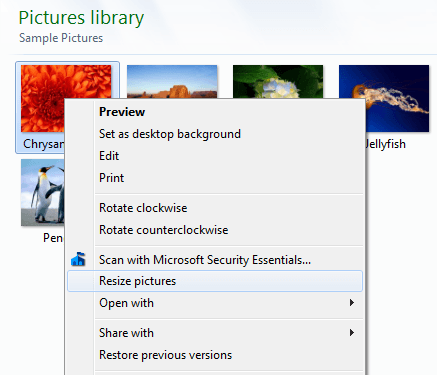
- **Click “Resize pictures”**. The Image Resizer utility appears.
###Settings
Now we’ll set up the utility. It’s very simple, the presets will work great, and it will remember the settings you choose for future use. (You can safely ignore the advanced settings.)
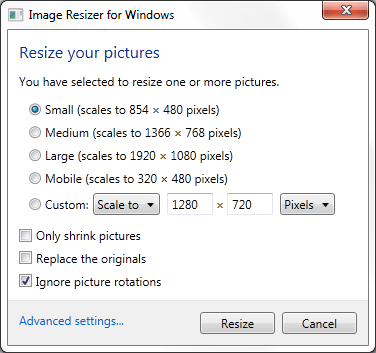
- **Pick the size** you want. For DOW, Medium or Large is a fine preset. Use Custom if you want to specify a size.
- **Leave the originals.** Make sure “Replace the originals” is unchecked - otherwise you will erase the larger original photo.
- **Click “Resize”**. The new smaller photos appear beside the old ones, with “large”, “medium” etc. added to the file name.
###Last step
- Add this smaller photo to your post. **Congratulations!** You’re now a photo resizing expert!
---
### Author:  [@kmrland](http://forum.driveonwood.com/u/kmrland)
#### Post date: [July 8, 2015, 5:55am UTC](http://forum.driveonwood.com/t/how-to-resize-photos-with-image-resizer/1828/2 "2015-07-08T05:55:07Z")
I tryed useing this app,and it said i needed a downloader bigger than what i have.do you have any down loader sites ,it seems when i try too find any thing too add, it ends up being a pay deal at the end.THANKS